
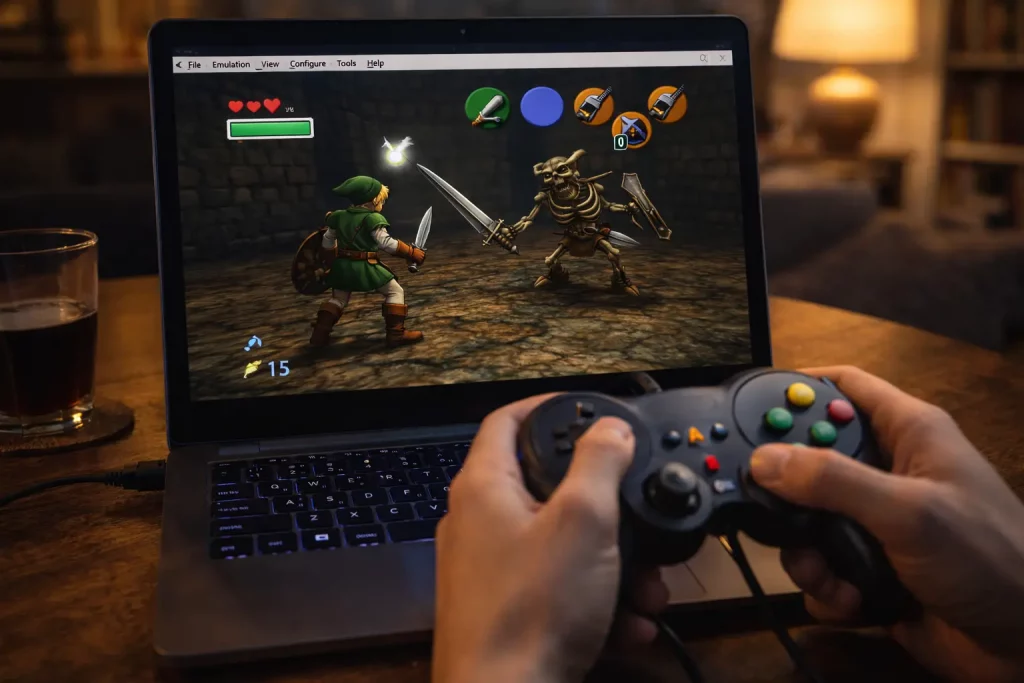
You know what? I didn’t expect to get hooked again. I thought I’d play for ten minutes, smile at the music, and move on. Nope. I blinked, and three dungeons flew by. I’ve been playing Ocarina of Time on emulators across my PC, my Steam Deck, and my Android phone. Here’s what worked, what bugged me, and the little things that made me grin like a kid.
Quick note: I used my own game dump from my old cartridge. Keep it legal if you can.
My setups (yes, I tried too many)
- PC: Windows 11, Project64 3.x with the GlideN64 video plugin. Xbox Series controller over Bluetooth.
- Steam Deck: RetroArch with the Mupen64Plus-Next core (via EmuDeck). Stock controls with a tiny tweak for the C-buttons.
- Android: Mupen64Plus FZ on a Pixel 6. 60 Hz screen, Bluetooth 8BitDo SN30 Pro.
I kept bouncing between them because, well, it’s Zelda. That Hyrule Field theme calls me.
For more emulator setup tips and troubleshooting, the guides on Zelda Sanctuary are a goldmine. Their in-depth guide to playing Ocarina of Time on an emulator even walks through controller-mapping quirks step by step.
The good stuff that made me smile
First, the frame rate felt smooth. The original game runs at 20 to 30 fps, and the emulators held that steady on my PC and Steam Deck. Kokiri Forest looked clean. The Deku Tree swirls still gave me that “uh-oh” feeling. Epona’s race? Hit the fence just right, and I still did a little victory laugh.
Widescreen was a treat. On PC with GlideN64, I used the widescreen setting. It made Hyrule Field feel bigger. Yes, the HUD stretches a bit, but the view is worth it. Shadows and fog looked right, too. That was not always true years ago.
Rumble worked. Stone of Agony buzzed near the hidden grotto by the big lone tree in Hyrule Field. On my Xbox controller, the rumble was crisp. That little buzz made secret spots feel, I don’t know, alive.
Save states saved my patience. That long owl speech? Fast-forward in RetroArch, then pop a state before a tough jump. I used a save state at the Water Temple central column (yes, that room) and thanked Past Me when I missed a shot. Again.
Fishing was still silly fun. With the right stick mapped to the C-buttons, I reeled quick. I caught the big one in about six tries. That’s a record for me. Not bragging. Well, okay—bragging a little.
The parts that fought me
Not all roses, though. The Lens of Truth made me nuts at first. On Project64, the Lens went blank. No illusions, no platforms, just sadness. Fix was simple: in GlideN64, I turned on Frame Buffer Emulation. After that, the Lens worked in the Shadow Temple and the Bottom of the Well. Creepy again, as it should be. If you’re curious about the nuts and bolts, this in-depth discussion on configuring GLideN64’s frame buffer emulation breaks it down step by step.
Audio crackle popped up on Android. It happened in crowded rooms in the Fire Temple. I fixed it by bumping the audio buffer in Mupen64Plus FZ, and the crackle calmed down. Stubborn crackle? This comprehensive guide to resolving audio crackling in Mupen64Plus covers buffer sizes, sync options, and device-specific quirks. But my phone still got warm after 30 minutes. The battery dipped fast, too.
Widescreen can be a bit weird. Sometimes enemies “pop” at the edge of the screen. And the HUD stretches. Not a deal-breaker—just saying it so you’re not surprised.
Controls took tinkering. The N64 C-buttons don’t feel perfect on a modern stick. On Steam Deck, I pushed the right stick deadzone down a hair and mapped C-Right and C-Left to the stick flicks. I also put C-Up on Y so I could pull out the ocarina fast. It worked, but I had to test in the Kakariko graveyard to get the timing right.
Oh, and save states can bite. I learned not to save during door transitions. I did that once in Jabu-Jabu, and it loaded to a black screen. I just used the in-game save before big rooms, then a quick state at the door if I had to.
A few real moments that stuck
- I used fast-forward to breeze through the Biggoron Sword trade steps, and I still felt the clock ticking with the frog-eyed guy at Lake Hylia. My palms got sweaty anyway.
- The Forest Temple hallway twist looked sharp with GlideN64. I paused just to watch it bend. It’s silly, but it felt magic again.
- RetroAchievements in RetroArch gave me cheevos for stuff like racing Dampe. I got one by a hair and pumped my fist alone in my kitchen. It was 10 p.m. My dog looked at me like, “Really?”
- The subscreen opened quick on PC, so picking items in boss rooms felt snappy. On my old N64, that pause had a tiny delay. Funny what you remember.
Craving that same beat-the-clock adrenaline outside of Hyrule? Real-life social quests can deliver a similar rush—especially events where every minute matters. If you’re in the Seattle area, try checking out this speed dating night in Bothell for a fast-paced, low-pressure way to meet a party’s worth of new people in a single evening—perfect for gamers who love efficient quests but want to level up their social circle, too.
Feeling proud of showing off my perfect boss runs reminded me that flaunting a hard-earned victory—gaming or otherwise—can be exhilarating. If that playful sense of “look what I can do” resonates with you beyond Hyrule, the cheeky French article « Je montre mon minou » over on Plan Sexe explores the idea of confidently revealing your more intimate side. You’ll pick up light-hearted tips on body positivity, posing, and embracing a daring streak that could boost your self-esteem just as much as nailing a no-damage Ganon fight.
Small fixes that helped me
- Project64 + GlideN64: Turn on Frame Buffer Emulation so Lens of Truth works. Widescreen on for a bigger view.
- Steam Deck: Mupen64Plus-Next core ran great at 30 fps. Map a fast ocarina button. Trust me during the Spirit Temple.
- Android: Raise audio buffer a bit. Lower internal resolution one step if heat spikes. It still looks good.
Mods and extras I tried
I played Master Quest (from my own disc backup). The emulator handled it fine on PC and Deck. I also used an HD texture pack on Project64. It looked clean in town areas and a little odd on faces. Navis’ voice felt louder with the audio tweak, but maybe that’s just my brain. Either way—she still yells, “Hey!”
I did try a randomizer one weekend. It worked in RetroArch, and it made the Kokiri shop feel like a garage sale. It’s chaos in a fun way, but I wouldn’t start there if you’re new.
Who should play where?
- PC: Best picture and the easiest fixes. If you want the cleanest run, do this.
- Steam Deck: Cozy on the couch. Solid speed. I played on a rainy Saturday and forgot time.
- Android: It works, but mind the heat and battery. Great for short runs—like a few Skulltulas while you wait for pasta water to boil.
Any downsides worth a warning?
- Widescreen can show stuff you weren’t meant to see at the edges. Not a bug, just modern life.
- Save states are power tools. Use them. Don’t trust them alone. Keep an in-game save.
- Some Bluetooth controllers add a tiny delay. Wired felt tighter for me, especially with the bow in the Forest Temple.
Final take
If you love Ocarina of Time, an emulator is a sweet way to play it today. It’s fast. It’s flexible. And yes, it still has heart. I felt real joy riding Epona across that field in widescreen, with clear sound and a gentle rumble when I hit a hidden hole. When I needed a breather away from the screen glare, I chilled out with some Legend of Zelda coloring pages—surprisingly therapeutic between boss fights.
It’s not perfect, but it’s close. After a few tweaks, I stopped fiddling and just played. That might be the best praise I can give: the tech faded, the adventure stayed.
Would I keep playing this way? Absolutely. I already started the Biggoron quest again. Old habits. New tricks.